Do one UHRS task through Clickworker on Sunday 25 October 2026 and, if everything goes right, the money joins a payout run that starts on Wednesday 16 December. That’s 52 days. Work on the Saturday instead and it’s 46. Both figures come straight from Clickworker’s own help centre, which we read on 21 October 2026, and they’re the most useful thing to know before you sign up.
Clickworker is legit. It’s a real company that has run its crowd platform since 2005, and since December 2024 it has belonged to LXT, an AI training data firm. Our verdict is Caution, though, because the pay is small, a lot of it sits on hold for weeks, and its US terms let the company close your account without giving a reason.
What is Clickworker, and who runs it now?
Clickworker is a crowdwork marketplace. Companies post small jobs (tagging images, writing product descriptions, answering surveys, recording voice clips, checking search results) and registered “Clickworkers” pick them up for a fixed fee per task. More and more of that work feeds AI models, the same trade as DataAnnotation and Outlier.
Many US members never work on clickworker.com itself. They pass Clickworker’s UHRS assessment and then do search and data tasks on Microsoft’s UHRS platform, with Clickworker acting as the vendor that pays them. The help centre says you need 80% on an English test to get in, and you can’t retake it.
Ownership changed recently. LXT, headquartered in Toronto, announced it had acquired Clickworker in December 2024 and put the combined crowd at more than six million freelancers.
How Clickworker pays, and why the money takes so long
Payouts are weekly. Clickworker starts its PayPal, Payoneer, ACH and eWallet bill runs on Wednesdays, and you don’t have to request anything. The catch is the gap between doing a task and that task becoming “payable.”
For ordinary jobs, the payment help pages say completed work takes between 7 and 30 days to become payable, for quality checks. UHRS work is slower. Earnings from Sunday to Saturday are added to your balance as a manual bonus the following Monday or Tuesday, and then it takes “exactly 39 days” before that bonus becomes payable. Here’s what that looks like with real dates:
| What happens | Date | Days since Sunday’s task |
|---|---|---|
| You finish UHRS tasks during one week | Sun 25 Oct to Sat 31 Oct 2026 | 0 |
| That week’s earnings appear as a bonus | Mon 2 or Tue 3 Nov | 8 or 9 |
| 39-day hold ends, balance becomes payable | Fri 11 or Sat 12 Dec | 47 or 48 |
| Next Wednesday bill run starts | Wed 16 Dec | 52 |
| Money reaches PayPal or Payoneer | “A few hours up to a day or two” later | 52 to 54 |
Two more conditions can push that back. Your payable balance has to clear the minimum for your payout method when the bill run starts (€10 for PayPal, €/$20 for Payoneer, $10 for ACH), or it rolls over to the next week. And any change to your profile puts payments “temporarily on hold” until you click a confirmation link in your email.
During those 39 days, the help centre says, UHRS can still check your work and reject it. A rejected job comes off your balance, so the figure you watch for six weeks isn’t guaranteed.
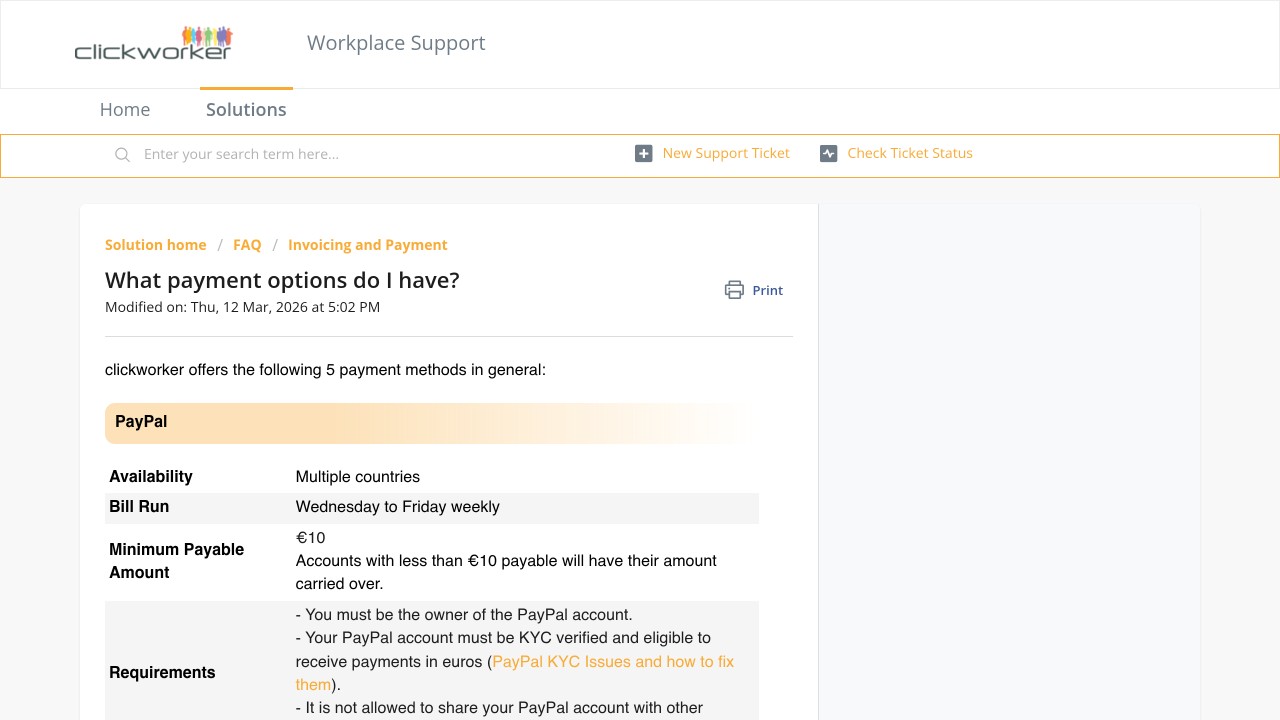
Clickworker’s help centre page on payment options (last modified 12 March 2026), screenshot taken 21 October 2026
Two US contracts, and neither matches the help centre
Clickworker’s terms page lists two different contracts for North America, and they don’t agree with each other or with the payment pages.
The clickworker.com, Inc. agreement carries an effective date of August 26, 2011. It promises Wednesday payouts once you hold at least $1.00 of fully earned pay, sent to “PayPal or MoneyBooker.” MoneyBooker is the old name of Skrill, and the help centre’s minimums today start at €10 or $10. That document is plainly out of date, yet it’s still linked as the US terms.
The second agreement belongs to LXT AI Inc., effective August 1, 2026. It covers people in the United States, Canada and Mexico, and it’s stricter:
- Claims go to binding individual arbitration with the American Arbitration Association, with a class-action waiver.
- PayPal is listed as a payout option only “if outside the United States.” US workers are pointed to Payoneer, i-Payout, AirTM or ACH.
- The company “is not required to pay You” if the client doesn’t pay for your work or rejects it.
- A new “Activity Points” program gives points that “have no intrinsic cash value,” and payouts can be delayed or cancelled if the program’s budget runs out.
The 2011 contract lets Clickworker end your account “for any reason or no reason,” without notice; the LXT one lets it end the account without cause on 30 days’ written notice. Both say that if you’re terminated for breaking the rules, any finished work that hasn’t been accepted yet counts as rejected and isn’t paid. We couldn’t confirm which of the two contracts a new US sign-up accepts today, because that’s only shown inside the registration flow.
Clickworker reviews: 64% five stars, but a 2.3 TrustScore
On 21 October 2026, Clickworker’s Trustpilot page showed 3,197 reviews. Of those, 2,037 were five stars and 511 were one star. The TrustScore was 2.3.
The explanation is timing. Trustpilot weights recent reviews more heavily, and the recent ones are bad: of the 20 newest reviews of any rating, 16 were one star, one was two stars and only three were five stars. The glowing reviews are mostly old.
We read the 20 newest one-star reviews (2 September to 14 October 2026) and sorted them by what went wrong:
- Account blocked or banned, often right after sign-up or with money still in it: 5
- Pay too low for the time, such as “$0.04” for about an hour or “€10 in 1 year”: 4
- Support that felt automated or hard to reach, plus app complaints: 4
- Survey or task not credited, or paid less than shown: 3
- Offerwall games (through a partner called MyChips) that stopped tracking before a big reward, one worth €277: 3
- A fake “Clickworker” task scam run by impersonators: 1
Clickworker replied to every one of them, usually within hours; Trustpilot shows a 100% reply rate to negative reviews. Most replies send the person to a support ticket, so a reply isn’t the same as a fix.
Is Clickworker a scam?
No. A scam takes your money or your work and never pays anyone, and Clickworker pays on a published weekly schedule. What the complaints describe is a different problem: a platform that holds a lot of power over small sums, can suspend accounts with little explanation, and pays rates that rarely add up to a wage. Clickworker’s own job page says plainly that the work “is no substitute for full-time employment.”
Watch out for impersonators, though. One of the newest one-star reviews described being asked to like YouTube videos and then send money, and Clickworker answered that it doesn’t run campaigns like that. Real Clickworker jobs never ask you to pay anything.
One more thing to know before you take whatever job appears. Clickworker sells a “Website Traffic Boost” service in which, in its own words, members search set keywords, click a client’s site in the results and interact with it to send “engagement signals.” If you’re offered a search-and-click job, that’s probably what it is, and you can skip it.
Is Clickworker safe for your personal data?
You’ll hand over more than with most apps. Clickworker requires your real name and address, tax details before any payout, and sometimes identity documents when PayPal or Payoneer verification fails. Its help centre says accounts with wrong or missing details get closed, and earnings from a fake identity can’t be paid out.
Its site says it has held an ISO certification since 2022. We didn’t test its security ourselves. The safer habits are simple: use a separate email, never pay a “fee” to unlock jobs, and connect the payout method you’ll actually keep, because changing it later puts payments on hold.
Getting paid without surprises
- Pick the payout method before you start, and check it’s verified (PayPal must accept euros, and Payoneer must be linked to Clickworker’s funding source).
- Fill in the tax details early. Missing tax info is one of the first reasons the help centre gives for not being paid.
- Don’t use a VPN. UHRS access switches off when you log in through one, and registering from a different country can get the account suspended.
- Cash out regularly instead of letting a large balance build up, so a suspension can’t freeze months of work.
If you mainly want AI training work that pays by the hour, compare Clickworker with Alignerr or micro1 before committing your evenings to it.
FAQs
Is Clickworker legit in 2026?
Yes. It’s a real company that has run since 2005 and has been owned by LXT since December 2024. It pays weekly, but some earnings are held for 7 to 39 days before they’re payable, so treat it as pocket money with a long delay.
How long does Clickworker take to pay?
Ordinary jobs become payable after 7 to 30 days, UHRS earnings after 39 days plus the wait for the weekly bonus. Payouts then go out in the next Wednesday bill run, so UHRS work can take about 46 to 54 days to reach you.
What is the minimum payout on Clickworker?
According to the help centre, it’s €10 for PayPal and SEPA, €/$10 for eWallet and Airtm, €/$20 for Payoneer, and $10 for ACH. Anything below the minimum carries over to the next week.
Why was my Clickworker account suspended?
New accounts go through automatic checks for duplicate or incorrect details, and the help centre says suspicious data triggers a temporary suspension. Open a support ticket under “Suspension” and be ready to send documents.
Can I use PayPal for Clickworker in the US?
Clickworker’s help centre still lists PayPal, but the LXT AI agreement dated August 1, 2026 lists PayPal only for workers outside the United States. Check what your Payment details page offers before you start working.