
Keeping up with AI tools is a losing game if you try to track everything. Every week brings a fresh wave of platforms and updates, each promising to transform your productivity, and the honest reaction is usually a mix of curiosity and fatigue. The useful question is not “what’s new this week” but “which of these actually earns a place in my workflow.” This guide is built around that question.
Why it’s so hard to keep up
The scale of the market is part of the problem. According to Statista, the global AI software market is projected to surpass $126 billion by 2025, and all that investment translates into a relentless stream of new launches. Hundreds of artificial intelligence tools appear every month, each claiming to be the next essential thing, and the noise makes it genuinely hard to spot what adds value.
It helps to know the main categories rather than chasing individual names. AI writing and content tools like Jasper, ChatGPT, and Writesonic generate copy and drafts. Design and creativity tools such as Midjourney and DALL·E 3 turn prompts into images. Automation platforms like Zapier and Make are folding AI into workflows. Analytics tools such as Tableau and Power BI use machine learning to surface insights in data. And AI development platforms from OpenAI, Google, and Microsoft give developers the APIs to build custom applications. Knowing which box a tool falls into is half the battle against “tool paralysis.”
Standouts of 2025 so far
A handful of tools have had an outsized impact this year across different needs:
| Tool | Use case | Key strengths |
|---|---|---|
| ChatGPT (OpenAI) | Content and conversation | Strong language model, context handling, broad versatility |
| Midjourney | AI art and image generation | High-quality images from prompts, style control |
| Jasper AI | Marketing copy and blogging | Templates for ads, blogs, email; SEO features |
| Zapier AI | Workflow automation | AI-assisted task automation across connected apps |
| Runway ML | Video and creative editing | AI video editing, green screen, object tracking |
Most of these offer free tiers or trials, so you can test before committing, and they update often — ChatGPT has added plugins and browsing, and Midjourney has improved its image resolution. The common thread is that they automate the repetitive parts of a job and free you up for the parts that need judgment.
Which tools suit which work
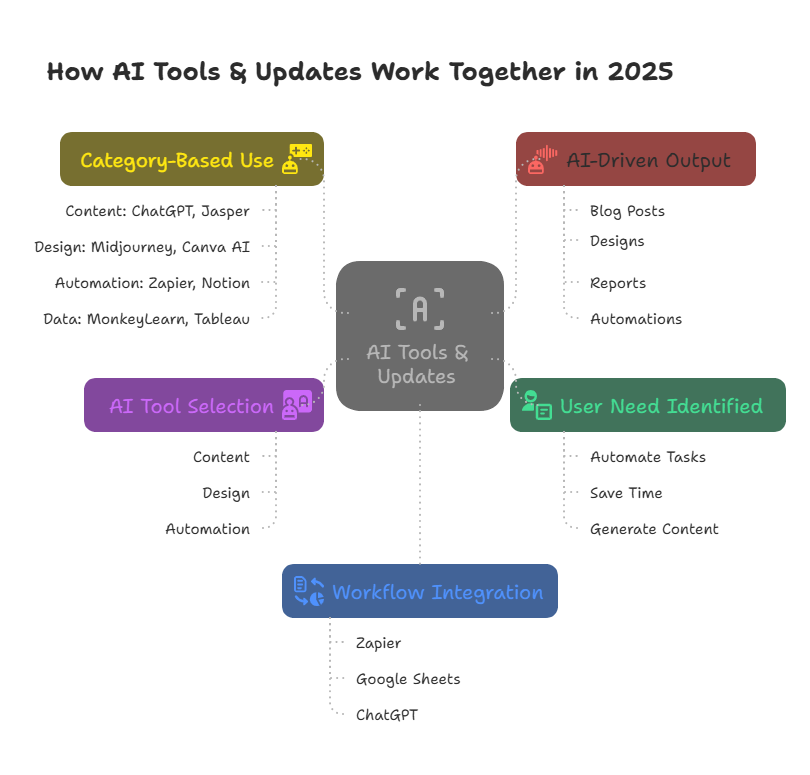
AI tools are not one-size-fits-all, and the best pick depends heavily on what you do. Content creators tend to reach for ChatGPT to brainstorm and draft, Jasper AI for SEO-ready templates, and Grammarly to polish the result. Designers lean on Midjourney and DALL·E 3 for concept art and mood boards, with Runway ML speeding up video post-production.
On the business side, Zapier AI handles routine automation across apps, HubSpot AI adds predictive analytics and chatbots to marketing and sales, and Tableau pairs AI with visualization for faster decisions. Developers building on top of AI generally live in the OpenAI API for language models, TensorFlow and PyTorch for training their own, and Hugging Face for open-source transformer models and community resources. Whatever the role, there is a tool that fits — the trick is matching it to your actual process rather than the hype around it.
How to choose without regret

With so much on offer, a little discipline saves both money and buyer’s remorse. Start by getting crystal clear on the problem you want solved — automating repetitive work, boosting creativity, or drawing insight from data — because a defined goal cuts the options down fast. Then weigh the budget: prices run from free to hundreds a month, so test with a free trial and only pay once the return is obvious. Ease of use matters more than raw power; a tool that takes weeks to learn may not be worth it unless you have the resources to invest.
Beyond that, check that the tool integrates with the apps you already use, since a poor fit creates more friction than it removes. Favor tools under active development with a visible roadmap, because a stagnant product falls behind quickly in this field. And look past the marketing to real reviews and case studies from people in your industry, since what works beautifully for one business can be a poor fit for another. Run through those questions and the daunting task of choosing becomes manageable.
What’s coming next
The landscape keeps shifting, and a few trends are worth watching. Generative AI is expanding past text and images into video, music, and 3D — Runway Gen-4 is pushing text-to-video, and platforms like Amper Music generate custom soundtracks. AI assistants are getting more capable, drafting emails and analyzing data rather than just scheduling, with Microsoft’s Copilot embedding deep into productivity suites. Low-code and no-code platforms like Lobe are opening AI development to non-programmers. Explainable AI tools are gaining ground as regulated industries demand transparency in how models decide. And hyper-personalization is sharpening, with marketing platforms tailoring content to individuals. Broadly, industry surveys such as Gartner’s 2025 research point to organizations steadily deepening their commitment to generative and low-code AI.
The risks worth keeping in view
For all their upside, these tools come with real limitations. Data privacy is the first: many process sensitive information in the cloud, and not every provider meets standards like GDPR or HIPAA, so vetting matters. Over-automation is the second — AI-generated content can lack nuance and empathy, and customer-facing work in particular needs a human balance. Bias is a third, since models can carry forward the prejudices in their training data, with serious stakes in hiring, lending, and healthcare. Then there is tool overload, where too many overlapping platforms fragment a workflow rather than streamline it, and vendor stability, since a tool from a shaky startup can vanish or lose support with little warning. None of this argues against using AI — it argues for using it deliberately, auditing your tools periodically to make sure they still meet your needs.
The takeaway
The AI tools boom is easier to navigate once you stop trying to track everything and start matching categories to your actual needs. Know what you are trying to solve, test before you pay, favor tools that are well integrated and actively developed, and stay alert to the privacy and bias risks. Do that and AI becomes a way to work smarter rather than one more source of overwhelm.
FAQs
What are AI tools used for?
They automate tasks, analyze data, generate content, and support decision-making across fields like healthcare, education, marketing, and finance.
How often do AI tools get updated?
Most receive updates every few weeks or months, improving accuracy, adding features, fixing bugs, and tightening security.
Can beginners use AI tools?
Yes. Many are built with simple interfaces, tutorials, and templates, so you can get going without any coding.
Are AI tools expensive?
It varies. Plenty are free or low-cost, while advanced features usually need a subscription priced by capability and usage.
How do I choose the right AI tool?
Match it to your goal, favor tools that are easy to use and well reviewed with good support, and test the free trial before you pay.