Grammarly’s help center tucks its most useful sentence about the free trial into a one-paragraph article: if you cancel during the seven days, the trial ends right then. Not on day seven. Your account drops straight back to the free version. So how you cancel a Grammarly subscription you only meant to test depends on one question: do you want the rest of the trial, or certainty that you won’t be charged?
Our rating is Caution, and it’s about billing, not legitimacy. Grammarly is a real product from a real company, now legally Superhuman Platform Inc. (formerly Grammarly, Inc.). The problem is a strict no-refund policy sitting on top of plans that cost $30 a month, $60 a quarter or $144 a year, and a steady trickle of people who say a trial turned into a full annual charge.
How to cancel Grammarly subscription on the website
This is the route for anyone who paid on grammarly.com. We took the steps from Grammarly’s own cancellation article on 27 October 2026. We didn’t click through them inside a paid account, because we don’t hold one, so treat the button names as the company’s description rather than our walk-through.
- Sign in and open the Account tab in the left sidebar.
- Choose Your account, then Subscription.
- Scroll to the bottom and click Cancel Subscription.
- Click Continue in the window that opens.
- Pick a reason and click Cancel Subscription again.
On a phone browser, go straight to account.grammarly.com. Three details trip people up. If there’s no cancel button, you’re probably signed in to a different Grammarly account from the one that pays. If you use other Superhuman apps (Coda, Superhuman Mail, Superhuman Go), cancelling through Grammarly applies across the whole suite. And a paid plan doesn’t stop on the day you cancel: you keep the paid features until the end of the period you’ve already paid for.
Stuck? Section 8.8 of the terms of service (effective 29 October 2025) says you can email [email protected] and say you want to cancel. Keep the reply as proof of the date.
Paid through the App Store or Google Play? Cancel there instead
Grammarly can’t cancel what Apple or Google bills. On an iPhone, open Settings, tap your name, then Subscriptions, and cancel Grammarly there (Apple’s own cancellation guide). On Android, open Google Play, tap your profile icon, then Payments and subscriptions, then Subscriptions (Google’s guide). Refunds follow a split too: Apple handles its own requests, while one of Grammarly’s help pages tells Google Play buyers to contact Grammarly support.
The app plan is still called Premium (web buyers were moved to Pro), and the prices differ. Here’s what each storefront listed on 27 October 2026:
| Billing period | Web (Grammarly Pro) | US App Store (Premium) |
|---|---|---|
| Monthly | $30 | $29.99 |
| Quarterly | $60 | $59.99 |
| Annual | $144 | $139.99 |
| Mobile only | Not listed | $17.99 a month or $83.99 a year |
Web prices come from Grammarly’s pricing help article; the app figures are the in-app purchase list on the US App Store listing. Your bank statement shows who charged you, and that decides the route.
Cancelling the Grammarly free trial: timing matters
The Pro trial lasts seven days. During it you may see a pending charge on your card; Grammarly’s trial billing article calls this a temporary verification hold that disappears if you cancel.
Here’s the catch. Cancel a paid plan and you keep it until the period runs out. Cancel the trial and, per the trial cancellation article, it ends immediately. Either cancel on day one and lose the rest, or set an alarm for day five or six and cancel then. Don’t rely on the reminder: the plans page promises an email two days before the trial ends, but more than one reviewer says it never arrived.
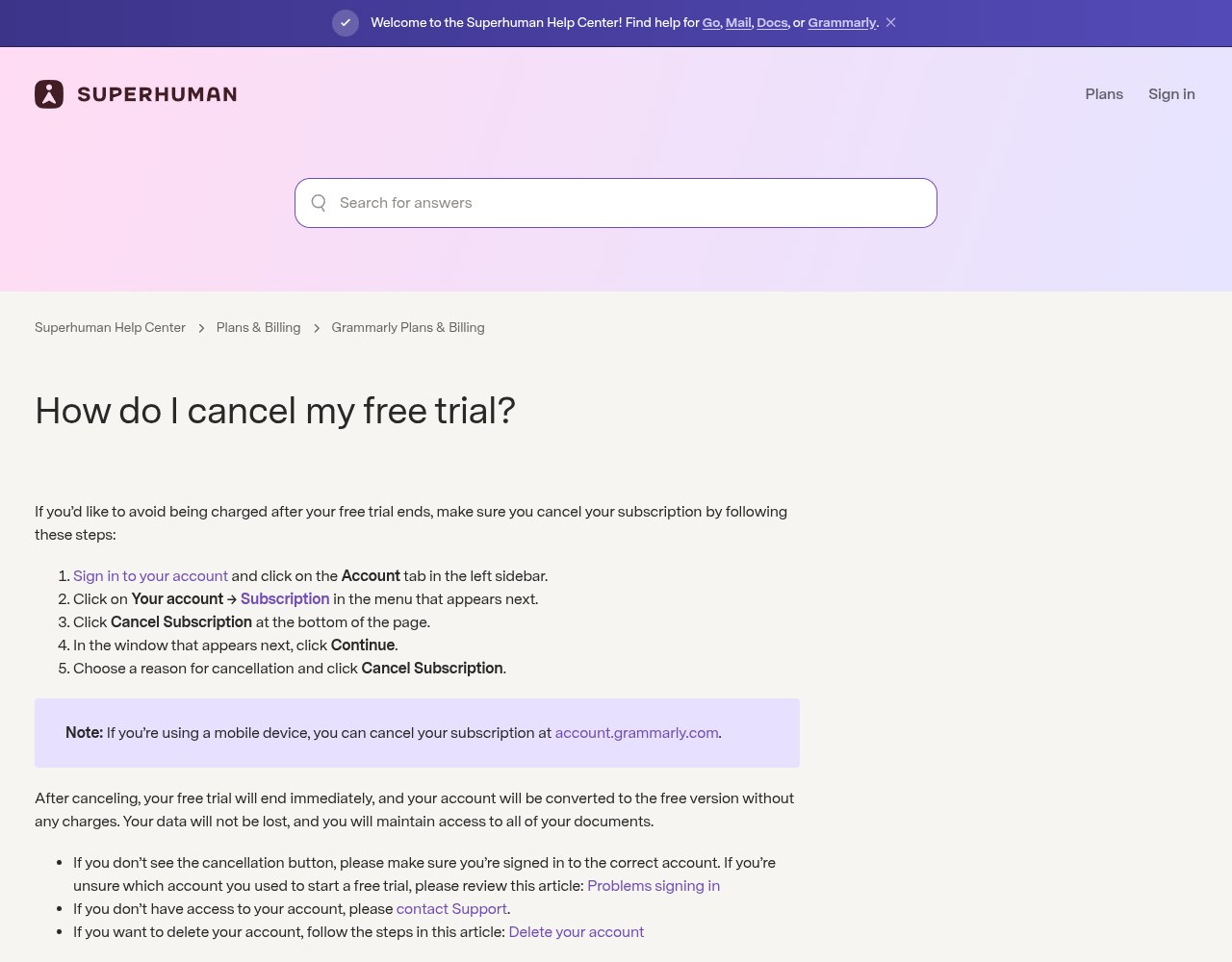
The trial cancellation article in Grammarly’s help center, which says a cancelled trial ends at once. Screenshot taken 27 October 2026.
What does the trial turn into? We couldn’t confirm that first-hand. The checkout at grammarly.com/upgrade/pro asks you to sign in before it shows a plan, and we don’t create accounts for reviews. The complaints point one way, though. People describing post-trial charges on Trustpilot name sums of $144, 144 euros, 120 pounds and 219 Australian dollars. Those are annual-plan amounts, not one month. If you start a trial, look at the billing period selected at checkout before you enter a card.
Grammarly refund policy, and the arithmetic behind it
The written rule is short. Grammarly’s refund article says you can cancel at any time, but refunds are issued “only if required by law.” Section 8.10 of the terms goes further: no refunds or credits for partly used periods.
Put numbers on it. The annual plan’s $144 equals 4.8 months at the $30 monthly rate. If you’d use Grammarly for five months or more, annual wins. If you cancel the annual plan after one month, you’ve paid $144 for about $30 of use, and the other $114 stays with Grammarly. The quarterly plan ($60) is the middle road: two months’ monthly price for three months’ access, and the most you can lose by changing your mind is $60.
Promotional prices make this worse. The billing policy says a promo rate lasts one period, then renews at the standard rate. A discounted first year renews at the full $144.
There are published exceptions, and they’re narrow:
- Billing mistakes. The billing policy invites a support request for any charge made in error and says the team will review it.
- Charges you didn’t authorize. The fraud article says Grammarly can cancel the subscription and block further charges right away.
- Moving to a team plan. Buy a team subscription with the same email and Grammarly refunds your individual plan pro rata, within about ten business days.
Practice is softer. We read the 20 newest one-star reviews on Grammarly’s Trustpilot page on 27 October 2026 (the latest dated 23 October). Seven were about money: surprise charges, trials that billed, refunds refused. In two of those seven, Grammarly’s public reply said support had already reversed the payment. Two in seven isn’t a policy, but a specific request sometimes works.
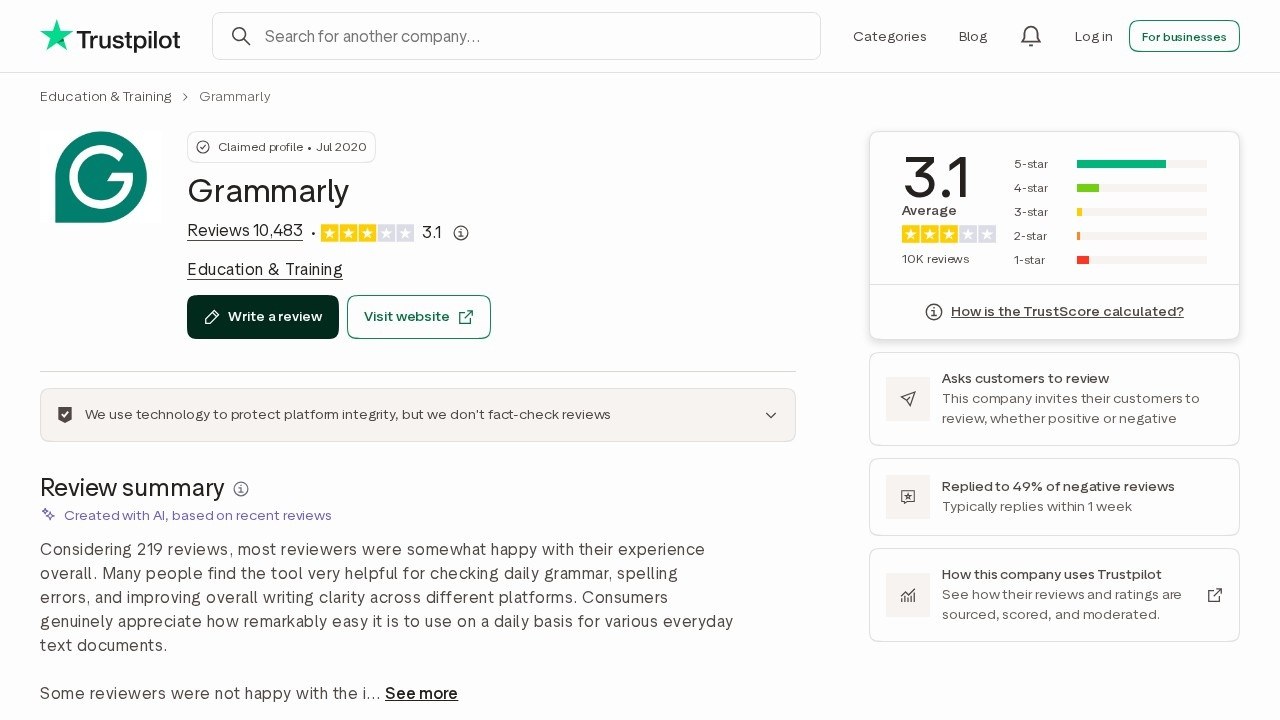
Grammarly’s Trustpilot profile with its 3.1 TrustScore. Screenshot taken 27 October 2026.
One more thing. At least one cancellation guide on Bing’s first page tells readers that annual Grammarly plans are refundable within 14 days. Grammarly’s own pages don’t say that anywhere we could find. Where a 14-day right does exist, it comes from consumer law (the UK and EU have cooling-off rules for many online purchases, which can be lost once you start using a digital service), and that’s the “required by law” case the policy refers to. If you’re in the UK or EU, cite those rules when you ask.
Still charged after you cancelled?
- Read the descriptor. Brex’s charge lookup lists Grammarly charges as “GRAMMARLY CO*” followed by a short code. An Apple or Google descriptor means the subscription lives in that store, not on grammarly.com.
- Look for a second account. One reviewer was charged $144 for an account they’d cancelled, then told they had no account. Check whether you signed up twice (with Google once and an email address once, say) and search every inbox for Grammarly receipts.
- Check for a replaced card. Grammarly’s help pages say banks can pass your new card number to it automatically, and some recurring charges even go through on an expired card. Cancelling the card isn’t the same as cancelling the plan.
- Ask in writing. Email [email protected] or use the support form with the charge date and amount, and say whether it was a billing error, an unauthorized charge or a cancelled trial: the cases its own pages treat as reviewable.
Comparing writing tools? Our JustDone AI review covers a $2 trial that renews at $29.99, and our look at Undetectable AI covers how its billing and cancellation terms work.
Is Grammarly a scam?
No. Calling it one would be wrong. Trustpilot shows a TrustScore of 3.1 from 10,483 reviews, but 68% of those reviews are five stars; Trustpilot weights recent reviews more heavily, which pulls the score below what the star split suggests. On the US App Store the app holds 4.7 out of 5 from about 227,000 ratings. The complaints cluster in two places: billing, covered above, and frustration with the redesign around Superhuman Go, which several long-time users say made the tool worse.
Hard to cancel at the wrong moment and stingy with refunds? Yes. Fraud? No. It’s the same distinction we drew for Coursiv’s refund rules and Use.AI’s trial pricing. One last clause for anyone planning a dispute: outside the European Economic Area, the terms send most claims to binding arbitration unless you opt out within 30 days of accepting them.
FAQs
How do I cancel my Grammarly subscription?
Sign in on the website, open Account, then Your account and Subscription, and click Cancel Subscription at the bottom of the page. If you paid through the App Store or Google Play, cancel in that store instead, because Grammarly can’t stop a charge Apple or Google bills.
Can I get a refund from Grammarly after cancelling?
Usually not. Grammarly’s policy says refunds are issued only when the law requires them, and its terms rule out refunds for partly used periods. Billing errors, unauthorized charges and team-plan upgrades are the published exceptions.
Does cancelling the Grammarly free trial end it right away?
Yes. Grammarly’s help center says a cancelled trial ends immediately and the account returns to the free version. If you want the full seven days, set a reminder and cancel on day five or six.
Why did Grammarly charge me $144?
$144 is a year of Grammarly Pro bought on the web. Reviewers who saw it say a trial or an old plan renewed annually; check the billing period on your Subscription page and look for a second account.
Do I lose my documents if I cancel Grammarly?
No. A cancelled paid plan converts to a free account under the terms, and Grammarly’s trial article says your documents stay. Deleting the account is a separate step with its own help article, so don’t do it by accident.