Quick answer
Cancelling Gemini also ends your extra Google storage. How to cancel on web, Android or iPhone without breaking Gmail.
Cancel a Gemini subscription and you lose more than the AI. Google sells Gemini’s paid tiers as Google One plans, so the same button also takes away your extra storage. If your Gmail, Drive and Photos hold more than the free 15 GB, Google’s own help page says Gmail then can’t send or receive messages, and mail sent to you bounces back to the sender.
That’s the one real trap. Otherwise Gemini is easy to leave: three clicks on the web, no retention maze in Google’s instructions, and you keep what you paid for until the billing period ends. Our billing verdict is Verified, with the storage warning attached. Every step below was checked against Google’s help pages and the app store listings on November 5, 2026. Google rearranges menus now and then, so if a label differs, the linked help article is the current word.
Check your storage before you press cancel
Open one.google.com/storage, or Settings in the Google One app, and look at the total. That single number decides how cancelling goes.
- Under 15 GB: cancel freely. You fall back to the free allowance and nothing breaks.
- Over 15 GB: once the paid period runs out, Gmail stops sending and receiving, Drive stops syncing and won’t let you create new Docs, Sheets or Slides, and Photos stops backing up. Your files aren’t wiped.
- Over 15 GB for two years: Google’s purchase and refund policy warns that after two years or more over quota, all of your content may be deleted.
Google AI Pro includes 5 TB, so it’s easy to have drifted far past 15 GB without noticing. If you have, clear space before the renewal date or switch to a cheap storage-only plan, covered further down.
Where you pay decides where you cancel
There are four ways to be billed for Gemini, and each one has its own button. Deleting the app does nothing. Cancelling inside Google One won’t stop a charge Apple is collecting, and the reverse is true as well.
| How you signed up | Where the cancel button is |
|---|---|
| On the web, or on an Android phone (billed by Google or Google Play) | Google One settings, or Subscriptions in the Play Store |
| On an iPhone or iPad, paid through Apple | Subscriptions in your iPhone settings or the App Store |
| A work or school Google account | Your organisation’s Google Workspace administrator |
| A phone carrier or device deal | The company that bills you, such as your carrier |
If you’re not sure which applies, search your email for a receipt. One from Apple means Apple bills you; one from Google or Google Play means Google does. Apple-billed AI subscriptions catch people with other brands too, which is why our ChatGPT cancellation guide and Claude guide both start with the same question.
Cancel Gemini on a computer
- Go to one.google.com and sign in with the Google account that pays.
- Click Settings, then Cancel membership.
- Click Cancel membership again to confirm.
- Wait for the confirmation that the subscription is cancelled, and keep it.
Gemini and the extra storage stay until the end of the billing cycle. Google’s page notes one exception in the US: a membership sponsored by Metro by T-Mobile ends the moment you cancel.
Cancel on an Android phone
- Open the Google One app.
- Tap Menu, then Settings, then Cancel membership.
- Tap Cancel membership to confirm.
The Play Store route works too if you subscribed there: tap your profile picture, then Payments and subscriptions, then Subscriptions, choose Google One, and cancel.
Cancel on an iPhone or iPad (Apple billing)
If Apple is charging you, only Apple can stop it. Google’s steps send you there anyway.
- Open the Google One app and tap Menu, then Membership plans, then Manage plan.
- Tap Cancel membership. Apple’s subscription page opens.
- Tap Cancel Subscription. You might need to scroll to find it.
The shortcut skips Google entirely: Settings, your name, Subscriptions, Google One, Cancel Subscription. If there’s no Cancel Subscription button, or the expiry date shows in red, Google says it’s already cancelled. Switched to Android since? The Android app can’t change an Apple-billed plan, so you’ll need the App Store on an Apple device.
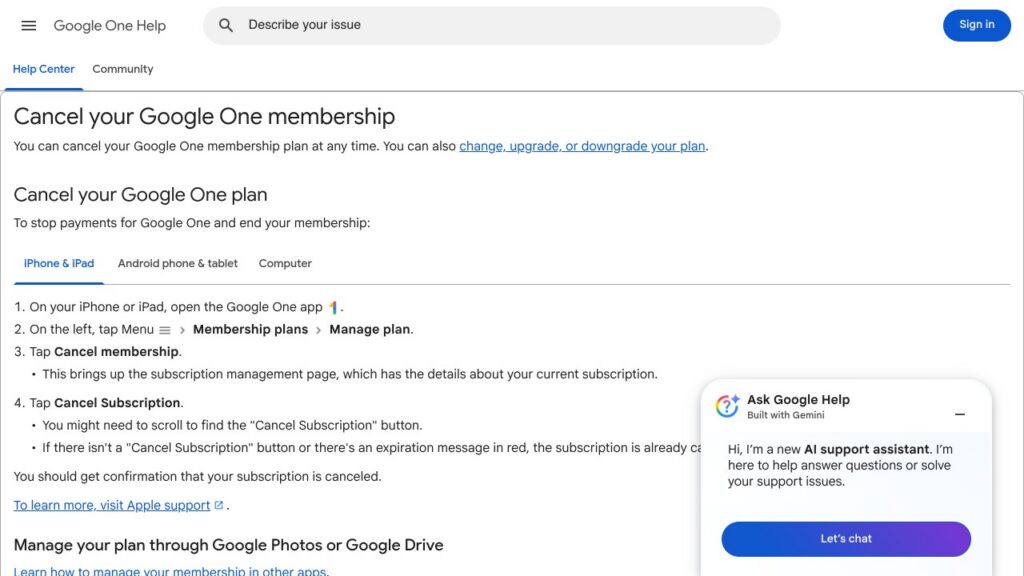
Google’s own cancellation steps for iPhone and iPad, from its Google One help page. Screenshot taken November 5, 2026.
Keep Gmail working: downgrade instead of cancelling
If what you want is to stop paying for the AI, and you’re over 15 GB, Google’s help page offers a middle path: decrease storage instead. On one.google.com, open Manage membership, then Change membership plan, and pick from the Downgrade options. Google says a downgrade takes effect at the start of your next billing cycle, so nothing switches off early.
These are the monthly prices the Gemini app’s US App Store listing showed on November 5, 2026:
| Plan | Storage | Monthly price through Apple |
|---|---|---|
| 100 GB storage plan | 100 GB | $1.99 |
| Google AI Plus | 400 GB | $4.99 |
| Google AI Pro | 5 TB | $19.99 |
| Google AI Ultra | 30 TB | $199.99 |
Bought straight from Google, AI Pro is $19.99 a month or $199.99 a year, and Ultra starts at $99.99 a month, billed monthly only, according to Google’s AI plans page. Android Central reported AI Plus at $7.99 a month when it launched in the US in January 2026, more than the Apple figure above, so check the price on your own plans page before switching.
The arithmetic is the point. A year of AI Pro on monthly billing costs $239.88. A year of the 100 GB plan costs $23.88, and your mail keeps arriving as long as you stay under 100 GB.
Refunds: Google’s default answer is no
Google’s policy says storage plan purchases are non-refundable in most countries, and that you keep the storage for the rest of the term after cancelling. Gemini’s paid tiers are storage plans in Google’s billing, so expect the same answer for the AI part.
There are a few exits. Purchases made through Google Play follow Play’s own refund rules, which include partial subscription refunds in Israel, France and Germany and a separate route for buyers in the EU and UK. Apple purchases go to reportaproblem.apple.com.
Being charged after you cancelled is a different case from forgetting to cancel. Find your confirmation, then use Google’s “Dispute, report, or cancel a payment” help topic, listed beside its cancellation article. If you’re also comparing billing practices across tools, our Grammarly cancellation guide shows how a stricter refund policy reads.
Trials and student deals renew on their own
Google’s trial page is blunt about it. A payment method is required “so that your membership can continue,” and when the trial ends you’re charged automatically. Cancel before the end date shown in your Google One settings, not on it.
Student offers work the same way. A footnote on Google’s plans page says the discounted student plans may renew at the standard monthly price once student status ends. Put that date in your calendar the day you sign up.
One last mix-up worth clearing. Samsung’s Galaxy AI features are a separate product from a Google One plan, so cancelling Google One won’t change them. Our Galaxy AI review covers what Samsung gives away free.
FAQs
Does cancelling Gemini delete my Gmail or Google Drive files?
Not straight away. You drop back to the free 15 GB at the end of the billing period. If you’re storing more than that, Gmail stops sending and receiving and Drive stops syncing until you free up space, and Google says content may be deleted after two years over quota.
How do I cancel Google AI Pro?
Google AI Pro is the Gemini subscription, so the steps are the same: on a computer go to one.google.com, then Settings, then Cancel membership. If you pay through Apple, cancel it in your iPhone’s Subscriptions settings instead.
Can I get a refund on a Gemini subscription?
Usually not. Google’s policy says storage plan purchases, which is how Gemini plans are billed, are non-refundable in most countries. Google Play and Apple purchases follow their own refund rules, and some countries have partial refunds.
Why is there no cancel button in the Gemini app?
Gemini is billed as a Google One plan, so the button lives in Google One settings, the Play Store or Apple’s Subscriptions page. On a work or school account, only your administrator can change it.
Do I keep Gemini Pro after I cancel?
Yes, until the end of the billing cycle you’ve paid for. Google lists one exception in the US: memberships sponsored by Metro by T-Mobile end as soon as you cancel.