Quick answer
Cancel ChatGPT on the web, iPhone or Android at least 24 hours early, and see who can still get a refund in 7 days.
Cancel at least 24 hours before your renewal date. Miss that, and the next month has probably already been charged. That single line from OpenAI’s own cancellation article, updated the day before we read it on 29 October 2026, explains most of the “I cancelled and still got billed” stories.
The good news: cancelling ChatGPT is quick, and OpenAI doesn’t hide the button. Our verdict on the billing is Verified. The catch is refunds. Payments are “generally non-refundable”, and the one general exception is a seven-day window for a plan you’ve barely touched. Where you cancel depends on where you paid, so start there.
Who bills you decides where you cancel
A plan bought on chatgpt.com won’t show up in your iPhone’s subscription list, and an App Store plan won’t show up in ChatGPT’s billing page. Check the receipt email or your card statement first. Then use this table.
| Where you subscribed | Where you cancel | Who handles a refund | Refund processing (if approved) |
|---|---|---|---|
| chatgpt.com or the desktop app | ChatGPT Settings, Billing | OpenAI, through the Help Center chat | 5 to 7 business days |
| iPhone or iPad (App Store) | iPhone Settings, Subscriptions | Apple | Apple says to expect an update in 24 to 48 hours |
| Android (Google Play) | Play Store, Subscriptions | OpenAI, through the Help Center chat (not Google) | Up to 10 business days |
| ChatGPT Business (self-serve) | Workspace settings, Billing | OpenAI Support, for the workspace owner | Unused seats are generally non-refundable |
The Google Play row surprises people. You cancel in Google Play, but OpenAI’s refund article tells Android subscribers to ask OpenAI, not Google, for the money back.
How to cancel ChatGPT on the website
- Sign in at chatgpt.com with the account that’s being charged.
- Open your account menu (your name or picture) and choose Settings.
- Choose Billing.
- Under Cancel plan, choose Cancel.
If the billing controls are missing, OpenAI’s fix is unglamorous: sign in to the same account in a different browser and try again.
Cancel a ChatGPT Plus subscription on iPhone or iPad
- Open the iPhone Settings app (not the ChatGPT app).
- Tap your name at the top.
- Tap Subscriptions, then ChatGPT.
- Tap Cancel Subscription and confirm.
If there’s no cancel button and you see an expiry date instead, it’s already cancelled.
Here’s the trap. Deleting your ChatGPT account does not stop an Apple subscription. OpenAI says so twice on the same page. Someone who deletes the account to “make sure” can keep paying Apple for a service they can no longer log in to. Cancel with Apple first, then delete if you still want to.
Cancel on Android through Google Play
Be signed in to the Google account that made the purchase. OpenAI’s own troubleshooting tells you to check every Google account on the phone if ChatGPT isn’t listed.
- Open the Google Play Store app and go to Subscriptions.
- Tap ChatGPT, then Cancel subscription.
- Follow the prompts to confirm.
On a computer, the same thing works from Google Play’s subscriptions page: choose Manage next to ChatGPT, then Cancel subscription.
ChatGPT Business and locked-out accounts
A self-serve Business plan is cancelled by whoever can see the billing page: Workspace settings, Billing, Manage plan, Cancel subscription. Enterprise and Edu plans aren’t covered by the self-serve route at all. If your company runs ads through that workspace, pause the campaigns first. OpenAI warns that losing workspace access doesn’t necessarily stop ad charges.
If you’ve lost the email address the plan sits on and OpenAI bills you directly, Support can cancel without you logging in. You’ll need the account or billing email plus any two of these: the card’s last four digits, its expiry date, the billing address, or the date of the latest charge. Never send the full card number; OpenAI’s article says so in as many words.
ChatGPT refunds: the seven-day rule and the 14-day exception
Cancelling and refunding are separate. Cancel stops the next charge. It doesn’t touch the last one.
OpenAI’s refund article (we read it on 29 October 2026) lists when money can come back:
- Within seven days of the charge, on a plan you haven’t really used. This one’s discretionary. It has to be the current billing period, with no “substantial use”, no open payment dispute, and limits on repeat refunds. OpenAI asks you to give a reason and confirm you understand access ends.
- EU, UK or Turkey residents: a prorated refund if you cancel within 14 days of purchase.
- OpenAI’s own mistakes: a verified billing error, a charge you didn’t authorise, or a documented service failure.
And when it can’t. Day eight brings no automatic prorated refund. Forgetting to cancel, an accidental purchase, being unhappy with the answers or switching plans “does not by itself qualify”. That’s blunt, and better known before you write in.
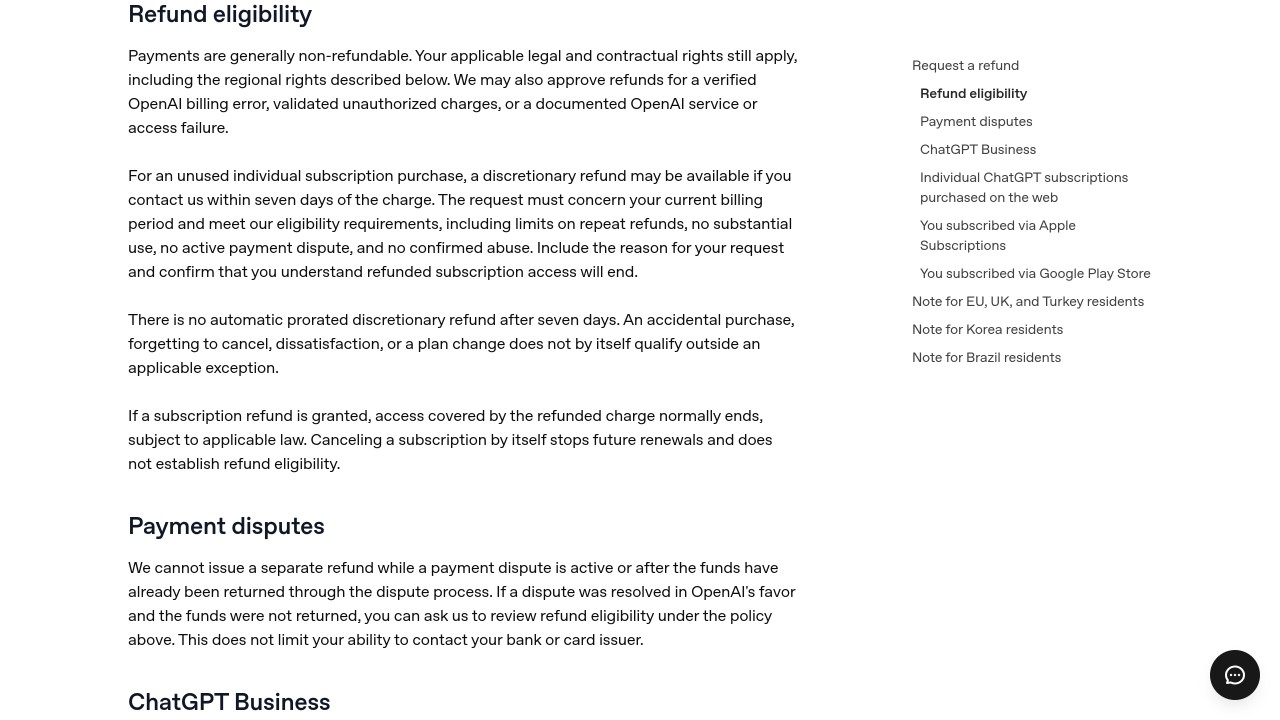
OpenAI’s refund eligibility rules for ChatGPT subscriptions, screenshot taken 29 October 2026.
Put dates on it. Say Plus renewed on 1 November. A request for that charge would have to reach OpenAI by 8 November, and only if you’d barely used it. To avoid the December charge, cancel before the same time on 30 November, a full day ahead. OpenAI doesn’t publish its formula for the EU and UK prorated refund. If it’s worked out by day, cancelling five days into a 30-day month would return about 25/30 of the fee, roughly five-sixths.
How to ask: sign in to ChatGPT, open help.openai.com while signed in to the same account, start the chat widget and request the refund there. The chat shows a quick eligibility summary before a person picks it up. If it says “login required”, it can’t see your subscription; log in and reopen it.
Apple purchases are different: OpenAI can’t refund them. Go to reportaproblem.apple.com, choose “I’d like to”, then “Request a refund”, pick a reason and select ChatGPT. Apple’s refund page says to expect an update within 24 to 48 hours.
One order matters. Ask OpenAI before you call your bank. OpenAI says it can’t issue a refund while a card dispute is open, or after the money has come back through one. A chargeback isn’t off the table; it’s simply the second step, not the first.
A cheaper plan might beat cancelling
If the problem is the price rather than ChatGPT itself, a smaller plan may do. These are the US monthly prices in OpenAI’s own price list for its pricing page when we checked on 29 October 2026, before tax:
| Plan | US price a month | What it adds |
|---|---|---|
| Free | $0 | Unlimited text chats with limits on uploads, images, voice and deep research |
| Go | $8 | More messages, uploads and memory; OpenAI says this plan may include ads |
| Plus | $20 | Advanced reasoning models, projects, scheduled tasks, custom GPTs |
| Pro | $100, $200 or $500 | Three usage tiers; the page advertises Pro “from” the lowest |
Going from Plus to Go saves $12 a month, or $144 over a year. Dropping from the $200 Pro tier to the $100 one halves the bill. Just remember the refund rule: a plan change on its own doesn’t earn a refund of what you’ve already paid, so time the switch for the end of a billing period.
After you cancel: what stays and what goes
Paid features keep working until the period you’ve paid for ends. Then the account drops to Free. Your chats aren’t deleted by cancelling, and Free still lists unlimited chat history. Projects and custom GPTs are paid features, so expect to lose the ability to use them. If a refund is granted, the paid access it covered normally ends straight away.
If you’re moving to another assistant, note that Claude can now search its own past chats on paid plans, but it can’t read your ChatGPT history. Our guide to referencing past chats in Claude covers the handoff summary that carries context across.
When the charges keep coming and none of the three places lists ChatGPT, look at the merchant name on the statement. Plenty of “AI chat” apps run on OpenAI’s models but bill under their own name, and cancelling ChatGPT does nothing to them. We found that with ChatOn, whose price changed depending on where you bought it, and with Use.AI, where a $1 trial turns into $29.99 on day seven. The same steps work for other big AI brands too: our Grammarly cancellation guide has its own trial quirk.
Menus move. These steps match OpenAI’s help pages as we read them on 29 October 2026. If a label has changed since, the platform that billed you is still the place to cancel.
FAQs
How do I cancel my ChatGPT subscription?
Cancel where you paid. On chatgpt.com it’s Settings, Billing, then Cancel under Cancel plan. App Store plans are cancelled in iPhone Settings under your name and Subscriptions, and Google Play plans in the Play Store’s Subscriptions list.
Can I get a refund for ChatGPT Plus?
Sometimes. OpenAI may refund an unused plan if you ask within seven days of the charge, and EU, UK and Turkey residents can get a prorated refund within 14 days. Forgetting to cancel doesn’t qualify on its own.
Does deleting my ChatGPT account cancel the subscription?
Only if OpenAI bills you directly. It doesn’t cancel an Apple App Store subscription, so cancel that with Apple first. Check Google Play too before deleting.
Why was I charged after I cancelled ChatGPT?
OpenAI’s troubleshooting points to two causes: the cancellation came less than 24 hours before the renewal, or a second subscription exists on another ChatGPT, Apple or Google account. Check each one, then ask OpenAI or Apple about the charge.
Do I lose my chats if I cancel ChatGPT Plus?
No. Cancelling doesn’t delete chats, and the Free plan still keeps chat history. You lose the paid features once the billing period ends.