Install Ace on a Windows PC and the Chrome you already use changes too. Ace’s own blog says so. The installer adds an extension called Ace AI Assistant to Chrome, makes Ace the default search engine in Chrome’s address bar, and does both through a browser policy. That policy is why Chrome suddenly shows “Managed by your organization” on a home computer. Ace explained all of this itself on September 20, 2026, after a thread appeared in Google’s help forum titled “Ace AI has taken over my browser.”
On the evidence we found, Ace AI is a real Chromium browser for Windows and macOS with a named company behind it, and nothing we saw shows it to be malware. Our verdict is still Caution, for four reasons: it alters a browser you never asked it to touch, the company admits some people received it through bundles and pop-ups they didn’t choose, its privacy policy is less tidy than its marketing, and uninstalling doesn’t stop a paid plan.
Last checked: October 2, 2026. How we checked this is explained at the end.
What is Ace AI? The Ace browser, and the other software sharing its name
Ace is a desktop web browser built on Chromium, the same engine as Chrome and Edge. Its assistant, Nova, opens in a panel beside whatever page you’re on and can summarize, compare and draft. The privacy policy names the company as Ace AI Labs Inc.
It’s free to start. Ace’s own explainer puts the free plan at up to 2,000 AI messages and 20 generated images a day, and Premium at $20 a month or $200 a year.
The name causes real confusion, because several unrelated programs use it:
- AceLauncher. A separate Windows program that security researchers class as potentially unwanted. It routes searches through Yahoo. Gridinsoft’s reading of its terms names a different company, Sunstream Labs, and Ace says it has nothing to do with it.
- Web Ace Tab. A 2023 Chrome extension that took over the new tab page. Also unrelated, according to Ace.
- Mobile apps called Ace. Ace’s blog isn’t consistent here. One post says mobile versions are still on the roadmap, so anything in an app store is a different product. Another, published the same day, mentions an iOS companion app. Only trust a mobile link that comes from ace.ai itself.
A correction on that last point: an earlier version of this review described a “Search Ace” app-store listing as part of the same product. We couldn’t confirm that, so we’ve removed it.
What the installer does to Chrome
Chrome has a feature called policies. Company IT departments use it to lock settings on work laptops. Any installer can write a policy too, and Ace’s Windows installer uses one to add its extension to Chrome without the usual “Add extension” prompt.
Three things follow. Chrome’s address bar starts sending searches to Ace. Chrome’s menu says the browser is managed. And the Remove button for the extension can be greyed out, because a policy is holding it in place.
Ace’s post concedes the point in plain words: “We should have made that clearer at install time.” It says a fix is being worked on.
Ace’s own pages also disagree about how to get the extension out. Its AceLauncher post says to remove it from Chrome’s extensions page like any other extension. Its uninstall guide says that page doesn’t show the option, and sends you through the extension’s own settings instead. The policy explainer adds a third route for when the button is greyed out: delete an entry in the Windows Registry.
That’s the heart of the problem. Installing one browser shouldn’t end with a registry edit to repair another.
Is Ace AI a virus? Clean scans and angry reviews are both accurate
Website checkers look at a domain. The complaints are about how the program arrives and what it changes afterwards. Those are different questions, which is why the results look contradictory.
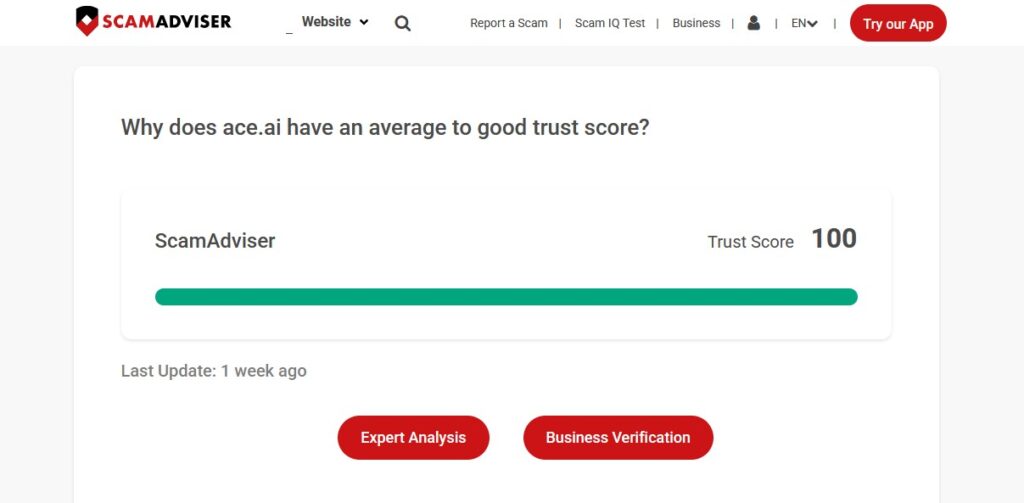
- ScamAdviser rates ace.ai as legit and safe to visit.
- VirusTotal showed none of its 91 security vendors flagging ace.ai when we checked on October 2, 2026. One categorization service does file the domain under “not recommended site.”
- Gridinsoft, in a guide updated September 29, 2026, says its records hold one AceSetup.exe sample, observed April 16, 2026, labelled PUP.AceBrowser. PUP means potentially unwanted program. Gridinsoft stresses that the label applies to that one file, and its answer on whether Ace is a virus is “Not by default.”
- Malwarebytes: Ace says Malwarebytes and ThreatDown withdrew their Ace-specific detection in July 2026. We couldn’t confirm that with Malwarebytes.
- Trustpilot shows 2.9 out of 5, but from only two reviews, both one-star, on an unclaimed profile. That’s too thin to lean on. One reviewer, writing in August 2026, describes a pop-up pushing the Ace download while they were trying to download a game.
- On Microsoft’s Q&A forum, a user wrote on June 17, 2026 that Ace had replaced their browser and kept trying to return.
Ace has explained the gap itself. In its post about AceLauncher, it writes that for a while some people got the browser through download bundles and pop-up funnels they hadn’t chosen. It says those people were right to be annoyed, and that it has been cutting those channels.
So both camps are describing something real. Choose Ace from ace.ai/download and you get a browser. Meet it beside a game download and it behaves like the software scanners are built to flag.
One loose end. The privacy policy names Ace AI Labs Inc., while the sample Gridinsoft recorded was signed by a publisher called BrowseAI LLC. We couldn’t establish how the two relate. Before running any AceSetup.exe, right-click it, open Properties, then Digital Signatures, and read the signer’s name. If it’s one you can’t account for, don’t run it.
The safety page next to the privacy policy
Ace’s safety page makes short, confident promises. The privacy policy, last updated June 16, 2026, is longer and more qualified. Side by side:
| The safety page says | The privacy policy says |
|---|---|
| It doesn’t keep a profile on you | Personal information is kept for 24 months after you stop using Ace, so that returning users can pick up again |
| With your permission, it collects a small amount of anonymous crash data, and that’s all | Collected user information includes IP address, internet provider, search history, hardware and software details, session time, ad impressions and cookie data |
| Your conversations aren’t used for targeted ads | AI chats aren’t shared with advertisers, but Ace can process them internally to personalize the chat, “including by presenting sponsored content” |
| It doesn’t sell your data | Agrees that nothing is sold. Adds that online identifiers and browsing data may be shared for targeted advertising, with an opt-out |
None of this is unusual for a free browser, and the policy does say imported history, bookmarks and passwords stay on your device. The gap is between the two documents. When they differ, the policy is the one that counts. Questions go to [email protected].
The usual AI-browser rule applies as well. An assistant that reads the page in front of you shouldn’t be pointed at your bank, your health portal or your private email. We made the same point in our reviews of the Comet AI browser and Perplexity, and for software that watches your screen in our Hakko AI review.
Undo it: Chrome first, then Ace
These steps come from Ace’s own guides as we read them on October 2, 2026. Menus move, so check the current uninstall page if something isn’t where it should be.
- Cancel Premium first, if you pay. Uninstalling the browser doesn’t cancel a paid plan. In Ace, open Menu, then Settings, then Ace account, and choose Cancel plan (or type ace://settings/aceAccount in the address bar). Billing questions go to [email protected]. At $20 a month, a forgotten plan costs $240 a year.
- See what’s controlling Chrome. Type chrome://policy into Chrome’s address bar. If the only entries mention an extension tied to Ace, that’s what triggered the “managed” message.
- Take search back. In Chrome, open Settings, then Search engine, and pick the one you normally use.
- Remove the extension. Click the puzzle-piece icon in Chrome’s toolbar, click Ace AI Assistant, choose Uninstall, then Remove Anyway. Chrome restarts briefly.
- Uninstall Ace. On Windows: Settings, Apps, Installed apps, find Ace Browser, click the three dots, Uninstall. On a Mac: quit Ace, drag it from Applications to the Trash, and empty the Trash. Ace says this also removes the Chrome extension.
- Check chrome://policy again. If an Ace entry survived, Ace’s fix is the Registry Editor. Press Windows key + R, type regedit, go to HKEY_LOCAL_MACHINE\SOFTWARE\Policies\Google\Chrome, then the same path under HKEY_CURRENT_USER, and delete only the entry whose value contains the Ace extension ID. Restart Chrome.
- Didn’t install it yourself? Run a full scan with security software you already trust. Gridinsoft’s advice is to change any passwords you typed into the unexpected browser, from a clean browser, once the scan is done.
Two cautions on step 6. Deleting the wrong registry key can break other software, so if you’ve never used regedit, ask someone who has or email [email protected]. And on a work or school laptop, policies are often legitimate. Ask your IT team before removing anything.
Is the Ace browser safe to keep, or should you remove it?
Keeping Ace is reasonable if you downloaded it yourself from ace.ai/download, you’ve decided what its extension may do in Chrome, and you keep the assistant away from sensitive pages.
Remove it if you don’t remember installing it, if Chrome’s search changed without a clear question first, or if it’s on a shared family PC where nobody agreed to it.
Ace is a legitimate product with a legitimate complaint against it. Until the installer asks before it touches Chrome, Caution stands.
How we checked this
On October 2, 2026 we read Ace’s safety page, uninstall guide, privacy policy and four of its blog posts, plus Gridinsoft’s removal guide, the Trustpilot profile for ace.ai, a Microsoft Q&A thread and the VirusTotal domain report. Every figure and date above comes from those pages.
We didn’t install Ace, so we haven’t confirmed the Chrome changes on a test machine. The description of them is Ace’s own. We also couldn’t confirm the Malwarebytes detection status or how BrowseAI LLC relates to Ace AI Labs Inc.
Prices, plans and features change often. Check the official site before you pay. Datalevo isn’t affiliated with or paid by any company mentioned here. Research and drafting were AI-assisted, and every figure was checked against the linked sources. Our full process is on the How We Review page.
FAQs
Is Ace AI safe to download?
It isn’t malware on current evidence, and VirusTotal showed no vendor flags on ace.ai on October 2, 2026. Download it only from ace.ai/download, and expect the Windows installer to add an extension to Chrome and change Chrome’s search engine.
What is Ace AI?
Ace is a Chromium-based desktop browser for Windows and macOS with a built-in assistant called Nova. Its privacy policy names Ace AI Labs Inc. as the company. It’s free with daily caps, and Premium costs $20 a month or $200 a year.
Is Ace browser a virus?
Security firm Gridinsoft says not by default. It logged one AceSetup.exe sample as a potentially unwanted program, a label for software that arrives or behaves in ways people didn’t agree to. Ace admits some installs came through bundles and pop-ups.
Is Ace AI legit?
Yes. It’s a real product from a real company, with published terms, a privacy policy and support contacts. Legit and well-behaved are separate questions, which is why our verdict is Caution and not Verified.
Why does Chrome say Managed by your organization after installing Ace?
Ace’s Windows installer adds its Chrome extension through a browser policy, and any policy triggers that message. Open chrome://policy to confirm, then remove the extension or uninstall Ace to clear it.
Does uninstalling Ace cancel a Premium subscription?
No. Ace’s uninstall guide says a paid plan keeps running after the browser is removed. Cancel first in Ace under Settings, Ace account, Cancel plan.